
If your internet feels unusually slow even though your connection speed seems fine, the issue may not be your bandwidth. In many cases, the real culprit is DNS delay. Understanding how to fix slow DNS lookup can significantly improve your browsing speed, reduce lag, and make websites load much faster.
The Domain Name System, commonly known as DNS, works like a translator between human-friendly website names and machine-readable IP addresses. Every time you type a website into your browser, your system performs a DNS lookup. When this process is slow, everything online feels delayed, even if your internet plan is fast.
This guide explains in simple terms why DNS lookups slow down and how you can fix the issue effectively without needing advanced technical knowledge.
What Is DNS Lookup and Why It Matters
A DNS lookup is the process your device uses to find the IP address of a website. Instead of remembering long numerical addresses, you simply type a domain name, and DNS does the rest.
When DNS works efficiently, websites load quickly. However, when DNS lookup is slow, it introduces a delay before the website even begins to load. This delay affects browsing, streaming, gaming, and even app performance.
A slow DNS response can increase latency, slow down page loading, and negatively impact overall internet performance. That is why fixing DNS issues is one of the most effective ways to speed up your connection.
Common Causes of Slow DNS Lookup
There are several reasons why DNS lookup becomes slow. One of the most common causes is an outdated or corrupted DNS cache. Your device stores DNS records locally to speed up access, but when these records become invalid, they can slow things down instead of helping.
Another major factor is the DNS server you are using. Many internet service providers assign default DNS servers that may not be optimized for speed. These servers can become overloaded, especially during peak usage times.
Network congestion also plays a role. When too many devices are connected or using bandwidth-heavy applications, DNS queries may take longer to process.
Incorrect network settings can also lead to delays. Even a small misconfiguration can increase lookup time. Additionally, malware or certain security programs may interfere with DNS resolution, causing noticeable slowdowns.
Also Read:- How to Set Up Voicemail on Any Phone (Easy Guide)
How to Fix Slow DNS Lookup
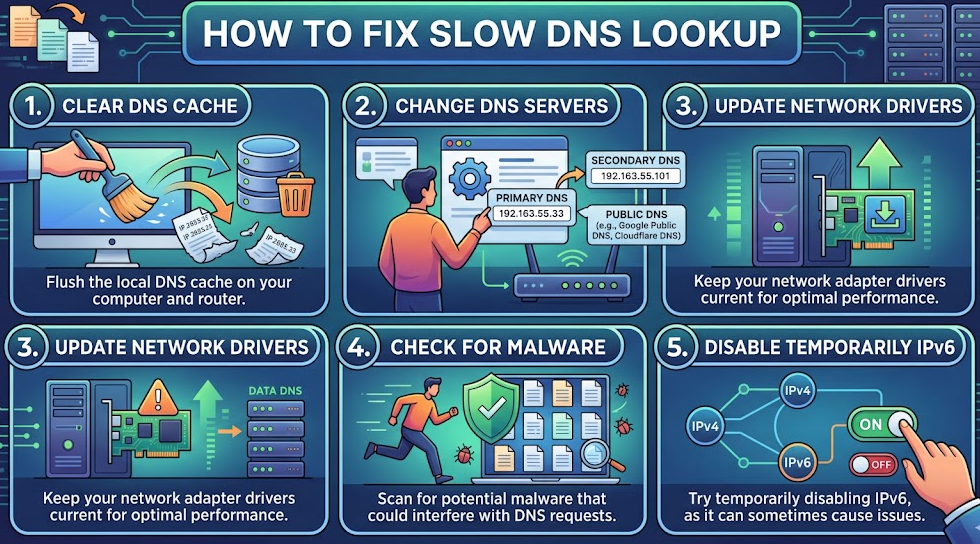
One of the simplest and most effective solutions is clearing your DNS cache. This removes outdated entries and forces your system to fetch fresh DNS data. On Windows, you can do this through the Command Prompt using a simple command, while macOS users can clear it through the Terminal. After doing this, many users notice immediate improvements.
Another powerful method is changing your DNS server. Instead of relying on your ISP’s default servers, you can switch to faster and more reliable public DNS services. Options like Google Public DNS or Cloudflare DNS are known for their speed and reliability. After switching, your device will use these optimized servers for faster lookups.
Restarting your router and device is another straightforward fix. Temporary glitches or memory issues in your networking hardware can slow down DNS performance. A quick restart often refreshes the connection and resolves minor issues.
You should also check for unnecessary background applications. Programs running in the background can consume bandwidth and interfere with network performance. Closing unused apps can help improve DNS response time.
Running a malware scan is equally important. Some malicious software alters DNS settings or redirects traffic, which can slow down lookups. Using a trusted antivirus tool ensures your system is clean and functioning properly.
Updating your network drivers is another step that should not be ignored. Outdated drivers can lead to inefficiencies and slow communication between your system and the network.
Modern browsers also support DNS prefetching, a feature that resolves domain names before you click on them. Keeping this feature enabled can help reduce delays and improve browsing speed.
Advanced Ways to Improve DNS Speed
For users who want deeper optimization, there are more advanced solutions available. Using a DNS benchmarking tool allows you to test different DNS servers and find the fastest option based on your location.
You can also configure Quality of Service settings on your router. These settings prioritize certain types of traffic, including DNS requests, ensuring faster response times.
While VPNs are useful for privacy, they can sometimes slow DNS resolution. Choosing a high-quality VPN with fast DNS infrastructure can prevent this issue.
Switching to IPv6, if supported by your network, may also improve DNS performance in certain situations. Although not always necessary, it can provide better efficiency depending on your setup.
Also Read:- How to Repair Drywall: A Complete Beginner-Friendly Guide
How DNS Impacts Website Performance
DNS performance is not only important for users but also for website owners. A slow DNS lookup increases the time it takes for a website to start loading, which directly affects user experience.
Search engines consider page speed as a ranking factor. If your DNS is slow, it can increase your website’s Time to First Byte, leading to lower rankings and higher bounce rates.
Website owners can optimize DNS by choosing a high-quality DNS hosting provider, enabling advanced routing methods, and reducing unnecessary DNS requests. Using a Content Delivery Network can also help distribute traffic and improve load times.
Real-Life Example of DNS Delay
Imagine opening an online store. Before the page fully loads, your browser must resolve multiple DNS queries for images, scripts, and other resources. If each lookup takes longer than expected, the total delay becomes noticeable.
By optimizing DNS, these delays are reduced, and the website loads much faster. This not only improves user experience but also increases engagement and conversions.
Preventing Slow DNS Lookup in the Future
Maintaining good DNS performance requires regular attention. Keeping your system updated ensures compatibility and efficiency. Clearing your DNS cache occasionally helps avoid outdated records.
Using a reliable DNS provider makes a significant difference in long-term performance. It is also important to avoid installing unknown software that may alter your DNS settings without your knowledge.
Monitoring your network performance from time to time can help you detect issues early and fix them before they become serious problems.
Also Read:- How to Look Younger: Simple, Natural Ways to Stay Youthful
Conclusion
Learning how to fix slow DNS lookup can make a noticeable difference in your internet experience. Even small improvements in DNS response time can lead to faster browsing, smoother streaming, and better overall performance.
By applying simple solutions like clearing your cache, switching DNS servers, and optimizing your network settings, you can eliminate delays and enjoy a faster connection. Whether you are a casual user or managing a website, DNS optimization is a powerful and often overlooked way to boost speed.
For More Visit Accurate Unit Convert














Leave a Reply