
Understanding how to convert binary to decimal is a foundational skill in computer science, mathematics, and digital electronics. Every digital device you use—computers, smartphones, calculators—relies on binary numbers internally, yet humans naturally think in decimal form. Learning this conversion bridges the gap between machine language and human understanding.
This guide is designed to help beginners and intermediate learners master binary-to-decimal conversion through clear explanations, step-by-step logic, real examples, and programming applications. By the end, you’ll confidently convert binary numbers manually and using popular programming languages like Python and Java.
What Is Binary and Decimal Number System?
Before learning how to convert binary to decimal, it’s essential to understand what both systems represent and why they exist.
The binary number system is a base-2 numeral system that uses only two digits: 0 and 1. Each digit is known as a bit, and its position determines its value based on powers of 2. Computers prefer binary because electronic circuits easily represent two states: on and off.
The decimal number system, also called base-10, uses ten digits from 0 to 9. Each digit’s position is based on powers of 10. Humans have used this system for centuries because it aligns naturally with counting using ten fingers.
Key Characteristics Explained
. Binary is a positional system where each digit represents a power of 2, increasing from right to left
Each position in a binary number doubles in value as you move left, which is why understanding positional value is critical. This structure allows computers to perform calculations efficiently using electrical signals.
Decimal uses positional notation based on powers of 10
In decimal, every digit represents units, tens, hundreds, and so on. This familiarity makes decimal intuitive for humans but inefficient for machine-level processing.
. Binary numbers are compact representations of electrical states
Binary simplifies hardware design by avoiding ambiguous voltage levels. A circuit only needs to detect high or low voltage, mapping directly to 1 or 0.
. Decimal is used for human-readable output
Even though computers process binary internally, results are converted into decimal so users can easily understand values such as prices, scores, or measurements.
. Understanding both systems improves logical thinking
Learning binary strengthens problem-solving skills and deepens understanding of how digital systems operate internally.
How Do You Convert Binary to Decimal?
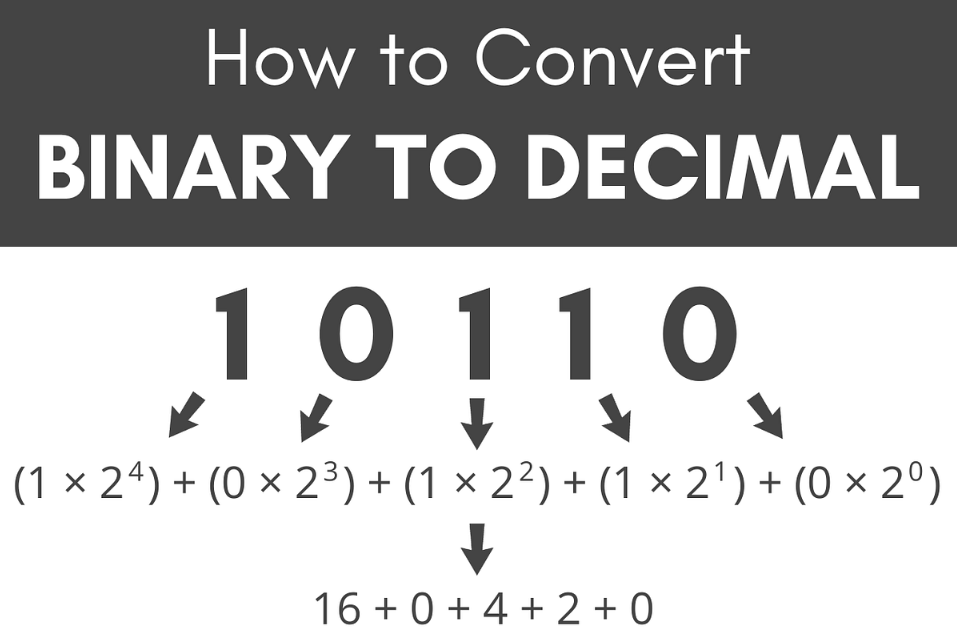
To truly understand how do you convert binary to decimal, you need to grasp the concept of positional weights and summation.
Binary to decimal conversion works by multiplying each binary digit by its corresponding power of 2 and then adding the results. The rightmost digit starts with 2⁰, and each position moving left increases the exponent by one.
Conceptual Breakdown
. Identify each digit’s position starting from the rightmost bit
The rightmost bit always represents 2⁰, which equals 1. Every move left doubles the value, forming the backbone of the conversion process.
. Assign powers of two to each position
For example, positions may represent 2⁰, 2¹, 2², 2³, and so on. These powers define the weight of each binary digit.
. Multiply each binary digit by its positional value
If the digit is 1, the positional value is added. If it’s 0, it contributes nothing to the total.
. Add all calculated values together
The sum of these values gives the final decimal number. This method ensures accuracy and consistency.
. This process works for any binary length
Whether the binary number has 4 bits or 64 bits, the same rule applies universally.
. Manual conversion improves understanding of digital logic
Doing conversions by hand builds intuition and prepares learners for advanced topics like binary arithmetic and computer architecture.
Also Read:- How Many Centimeters in an Inch? Exact Answer & Examples
How to Convert Binary to Decimal Step by Step

Learning how to convert binary to decimal step by step makes the process approachable, even for complete beginners.
Let’s take the binary number 101101 as an example.
Step-by-Step Explanation
. Write the binary number and label positions from right to left
Start by writing the number clearly and assigning powers of two beginning with zero on the rightmost side.
. Assign powers of 2 to each digit
For 101101, the positions represent 2⁵, 2⁴, 2³, 2², 2¹, and 2⁰ respectively.
. Multiply each binary digit by its power of 2
Digits with value 1 keep their power; digits with 0 become zero when multiplied.
. Ignore positions where the digit is zero
This simplifies the calculation and reduces the chance of errors.
. Add the remaining values together
Summing the selected powers of two gives the final decimal result.
. Verify the result using a calculator or program
Double-checking builds confidence and reinforces accuracy.
This method ensures clarity and avoids shortcuts that often confuse learners.
Also Read:- How to Convert cm to Inche – Simple Formula & Examples
Convert Binary to Decimal Using Mathematical Formula
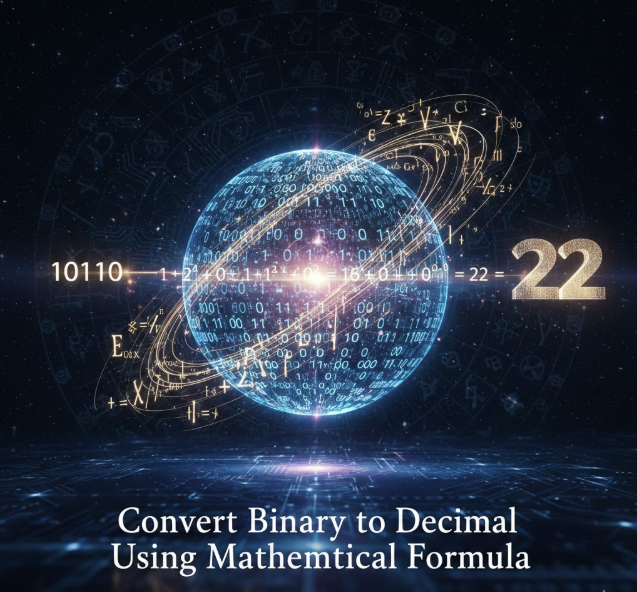
Binary to decimal conversion can also be explained using a mathematical expression, making it easier for students with a math background.
The formula is:
Decimal Value = Σ (Binary Digit × 2ⁿ)
Where n represents the position of the digit starting from zero on the right.
Why the Formula Works
. Binary is a base-2 system by definition
Each digit represents a power of two, making the formula logically consistent.
. The summation captures positional contribution
Only digits with value 1 contribute to the final sum, simplifying calculations.
. This formula scales to large numbers easily
It works the same way whether converting small binary values or large memory addresses.
. Useful for algorithm design and exams
Many academic problems expect students to use this formal representation.
. Forms the basis of binary arithmetic
Addition, subtraction, and multiplication all rely on this positional weighting.
. Enhances understanding of number systems
Seeing binary as a mathematical structure builds conceptual clarity beyond memorization.
Also Read:- How to Prepare Oysters: The Ultimate Guide for Beginners and Pros
How to Convert Binary to Decimal in Python

Understanding how to convert binary to decimal in Python is essential for programmers working with data, networking, or embedded systems.
Python provides built-in tools that make conversion both easy and reliable.
Python Conversion Explained
. Python treats binary numbers as strings or prefixed integers
Binary values often appear as strings like “1011” or with a prefix like 0b1011.
. The int() function simplifies conversion
By specifying base 2, Python automatically interprets the binary string.
. Manual conversion helps learning despite automation
Writing your own conversion logic strengthens understanding of loops and powers.
. Python ensures accuracy for very large numbers
Unlike some languages, Python handles arbitrary-length integers safely.
. Conversion is commonly used in data processing
Binary values appear in encryption, compression, and low-level data formats.
. Python is ideal for teaching binary concepts
Its readable syntax makes it perfect for beginners learning number systems.
How to Convert Binary to Decimal in Java
Learning how to convert binary to decimal in Java is especially useful for students and professionals working in enterprise or Android development.
Java includes standard libraries for binary conversion while also allowing manual implementations.
Java Conversion Explained
. Java uses Integer.parseInt() for base conversion
By specifying radix 2, Java converts binary strings directly to decimal.
. Strong typing ensures conversion safety
Java enforces data types, reducing accidental misuse of values.
. Manual logic improves understanding of loops
Writing your own binary conversion strengthens control-flow and math skills.
. Java handles binary in networking and file systems
Binary data is common in protocols, bitwise operations, and compression.
. Conversion supports debugging low-level operations
Interpreting binary helps developers understand memory and bit manipulation.
. Java’s consistency makes conversions predictable
Once learned, the same approach works across platforms and applications.
Common Mistakes When Converting Binary to Decimal
Even simple conversions can go wrong if foundational concepts are misunderstood.
Mistakes to Avoid
. Miscounting positional values
Assigning incorrect powers of two leads to wrong results.
. Starting powers from the left instead of right
Binary positional counting always starts from the rightmost digit.
. Forgetting that 2⁰ equals 1
This small oversight can shift the entire result.
. Treating binary like decimal
Binary digits only represent presence or absence of a power of two.
. Skipping verification
Failing to double-check results increases the chance of silent errors.
. Relying solely on tools without understanding
Tools help, but conceptual knowledge prevents mistakes in exams and interviews.
Real-World Applications of Binary to Decimal Conversion

Binary-to-decimal conversion is not just academic; it’s widely used in real systems.
Practical Uses
. Computer memory addressing
Memory locations are stored in binary but displayed in decimal or hexadecimal.
. Networking and IP addressing
Binary representations help understand subnetting and routing.
. Digital electronics and microcontrollers
Engineers convert binary sensor data into readable decimal values.
. Data encoding and compression
Binary streams are decoded into meaningful numeric values.
. Programming and debugging
Developers inspect binary data during performance tuning and bug fixing.
. Cybersecurity and cryptography
Binary patterns form the foundation of encryption algorithms.
Frequently Asked Questions (FAQs)
What is the easiest way to convert binary to decimal?
The easiest method is multiplying each binary digit by its corresponding power of two and adding the results.
Can binary numbers include digits other than 0 and 1?
No, binary strictly uses only 0 and 1.
Why do computers use binary instead of decimal?
Binary matches electronic circuit states, making hardware simpler and more reliable.
Is binary to decimal conversion important for programming?
Yes, especially in low-level programming, debugging, and understanding system operations.
Can I convert binary to decimal without a calculator?
Yes, using the positional value method explained in this guide.
Conclusion
Learning how to convert binary to decimal is a critical skill that connects human logic with machine operations. Whether you are a student, programmer, or tech enthusiast, mastering this conversion improves your understanding of how digital systems work at their core.
By understanding positional values, practicing step-by-step conversions, and applying the knowledge in Python and Java, you build a strong foundation in computer science. With consistent practice, binary numbers will no longer feel abstract—they’ll become intuitive and meaningful.
For More Visit Accurate Unit Convert














Leave a Reply