

When you first learn how to code, the conditional loop is one of the most exciting tools in your toolkit. It feels incredibly logical: you tell the computer to start at zero, check a condition, perform an action, and repeat the process until the task is complete. For small school projects involving ten or twenty items, this works perfectly. However, as your computer science assignments grow to involve massive data arrays, thousands of coordinates, or real-time simulation coordinates, those trusty nested structures can hit a massive performance wall. Your script slows down to a crawl, your computer fan spins at top speed, and your submission deadline approaches rapidly.
The secret that experienced software engineers and university researchers know is that looping through data entries individually is often the least efficient way to talk to a modern computer processor. This issue is especially prominent in numerical computing environments where large matrices are the default data structure. If you are struggling with a complex engineering project or running out of time to fix slow execution speeds, seeking specialized MATLAB assignment help from myassignmenthelp can give you the technical clarity needed to refactor your code efficiently before submission. Learning how to move away from repetitive index-based iteration is a major milestone that transforms a basic beginner student into a skilled, high-performance programmer.
Understanding the “Loop Penalty” and System Architecture
To understand why a loop runs slowly, we need to look under the hood at how a computer’s Central Processing Unit (CPU) interacts with your software environment. High-level languages are designed to be human-readable, which means they hide a massive amount of background work. When you write a basic iterative sequence, you force the computer to perform dozens of hidden micro-operations for every single index step.
The Hidden Overhead Matrix
On every loop cycle, the execution engine must perform the following tasks:
- Boundary Checking: Verifying if the counter variable has exceeded the maximum limit of the collection.
- Type Validation: Confirming that the data type within the current array element hasn’t changed dynamically.
- Pointer Arithmetic: Looking up the specific physical memory address of the current index location.
- Index Incrementing: Adding to the counter and updating the program pointer to prepare for the next step.
When you nest these structures inside one another, the problem multiplies exponentially. An outer sequence running 1,000 times combined with an inner sequence running 1,000 times means the computer performs these structural micro-checks exactly one million times. This overhead creates a major performance bottleneck, resulting in long execution times for tasks that should take less than a fraction of a second.
[Traditional For-Loop Workflow: Serial Processing]
Check Index 1 -> Read Element 1 -> Perform Operation -> Increment Counter
Check Index 2 -> Read Element 2 -> Perform Operation -> Increment Counter … (Slow Loop Repeat)
[Vectorized Workflow: Parallel SIMD Processing]
Read Entire Data Vector -> Load Into CPU Registers -> Apply Operation Universally -> Output Clean Array
Modern computer processors are engineered around an concept called Single Instruction, Multiple Data (SIMD). This hardware feature allows a CPU to take an entire vector of data points, load it into a wide register file, and execute a single instruction (like addition or multiplication) across all those points simultaneously. When you force a processor to execute a slow, linear loop, you bypass SIMD entirely, turning your state-of-the-art multi-core computer into a sequential machine processing data one piece at a time.
The Power of Vectorization
The most effective alternative to a slow iterative loop is a process known as vectorization. Vectorization means redesigning your code so that an operation is applied to an entire array or data vector all at once, rather than stepping through it element by element. Instead of writing detailed instructions that tell the computer how to step through memory, you simply state the mathematical relationship between the input data and the desired output array.
Most technical programming environments use highly optimized, compiled software libraries behind the scenes to execute mathematics. When you write a vectorized statement, your high-level language passes the entire data operation directly down to these low-level internal libraries, which are often written in highly optimized C, C++, or Fortran. This approach allows your code to run near native hardware speeds, cutting down computation times from hours to milliseconds.
Deep Dive: Advanced Techniques to Speed Up Your Code
If you want to clear out the bottlenecks in your computer science homework and make your code run significantly faster, focus on implementing these four foundational code optimization strategies.
1. Master Array Preallocation
One of the main reasons loops run incredibly slowly is that students often forget to reserve memory for their results before the calculation starts. If you create an empty variable and dynamically grow its size inside an iterative block, you are committing an error known as dynamic memory re-allocation.
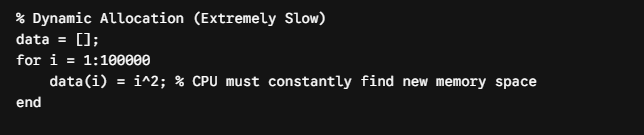
Every single time the loop adds an element, the operating system must find a new, larger sequential block of physical memory, copy all existing data over to the new location, append the new value, and then free up the old memory space. For an array with hundreds of thousands of items, this memory thrashing destroys performance.
You can fix this easily by using preallocation. By initializing your output array with its final size using filler values like zeros before running your calculations, you reserve the necessary memory block upfront. This simple adjustment ensures the computer only has to allocate memory once, which can dramatically speed up your execution times.
2. Utilizing Built-In Matrix Mathematics
Instead of using manual indexing loops to modify every individual value in a dataset, use built-in array arithmetic. Most technical languages treat matrices as first-class citizens. This means you can add, subtract, multiply, or divide an entire dataset by a scalar value or another matching array in a single line of code without using an index.
For example, if you need to calculate the hypotenuse for thousands of coordinate pairs ($c = \sqrt{a^2 + b^2}$), do not write a script that processes each index one by one. Pass the entire vector of $a$ coordinates and $b$ coordinates directly into the native math functions. The internal architecture will process the numbers simultaneously, rendering manual tracking completely obsolete.
3. Logical Array Indexing (Masking)
Students frequently use conditional statements inside loops to scan a dataset and modify only the values that meet a specific criteria. This design creates a massive drag on performance because it causes branch misprediction at the processor level, forcing the CPU to stall while it guesses which direction the conditional logic will take.
Instead, you can use logical indexing to create a data mask. By applying a conditional comparison directly to the entire array, you generate a binary layout of true and false flags. You can then use this mask to update all the target elements simultaneously in a single step, removing the need for slow conditional checks inside an iterative loop.
4. Replacing Coordinate Loops with Grid Generation
When plotting 3D surfaces, simulating gravitational fields, or running image processing filters, students frequently nest multiple loops to handle 2D or 3D coordinate grids. This results in massive calculations that freeze your IDE.
Advanced computing environments offer grid generation utilities (such as coordinate grid functions) that instantly turn linear vectors into 2D coordinate matrices. Once these matrices are generated, you can perform complex surface transformations and spatial math calculations using flat, vectorized equations, saving massive amounts of development time and execution overhead.
Comprehensive Performance Optimization Matrix
To see the massive impact these changes can have, look at how different coding approaches handle a massive data task: processing and modifying a large array containing 10,000,000 numerical values.
| Optimization Approach | Code Complexity | Memory Management Strategy | CPU Register Utilization | Relative Execution Speed |
| Dynamic Looping | Low (Intuitive for beginners) | Extremely Poor: Millions of re-allocations as the array grows. | Single-core serial execution with constant stalls. | 1x (Baseline Slow) |
| Preallocated Looping | Moderate (Requires index sizing upfront) | Excellent: Reserves one continuous block of system memory at launch. | Reduces memory overhead but still processes data linearly. | 15x to 50x Faster |
| Vectorized Masking | Moderate (Requires abstract array logic) | Optimal: Built-in low-level optimization using memory tracks. | Full SIMD hardware acceleration across multiple cores. | 500x to 1000x Faster |
When you review your homework assignments using these metrics, you can easily spot exactly where your scripts are losing speed. Transitioning your projects from basic dynamic loops to fully vectorized code ensures your work scales efficiently, regardless of how large your datasets become.
Master These Strategies for Top Grades
Replacing slow loops with vectorized alternatives is more than just a quick fix for a slow script; it is a fundamental shift in how you solve problems as a computer scientist. It forces you to view your data as complete, integrated systems rather than collections of isolated points, which is essential for writing professional-grade software.
If you are facing tight academic deadlines and find yourself overwhelmed by complex coding projects, utilizing online assignment help can be an excellent way to learn advanced optimization methods from experienced specialists. By applying these optimization strategies to your weekly coursework, you will submit scripts that run faster, look cleaner, and demonstrate a sophisticated understanding of computer science fundamentals.
A Practical Refactoring Guide
Let’s look at a clear, practical example of how to transform a slow, loop-heavy script into a fast, vectorized alternative. Imagine you have an array containing one million data points, representing sensory readings from an engineering lab, and your task is to calculate the sine value for every single number that is greater than zero, while resetting negative readings to zero.
The Slow, Unoptimized Approach
This basic method relies on a slow loop and an inline conditional check to process every element individually. It runs slowly because it forces the computer to make one million separate decisions and step through memory sequentially.
The Fast, Vectorized Solution
This optimized version completely removes the loop and the conditional statement, achieving the exact same result in just two lines of code by utilizing logical indexing and a built-in math function.
By removing the manual index tracking entirely, the vectorized solution passes the array directly to the processor’s low-level execution layers. The script runs almost instantly, utilizing your hardware efficiently and helping you earn top marks on your computer science assignments.
Frequently Asked Questions
What exactly causes a loop to run so slowly?
Loops slow down execution because the computer must re-evaluate boundary limits, increment index variables, and verify data types on every single iteration. When processing thousands of data entries, this repetitive background operational overhead quickly triggers severe execution delays.
How does array preallocation improve code performance?
Preallocation reserves a single, fixed block of physical memory for your data before calculations begin. Without it, a program must constantly pause execution to find new, larger memory spaces and copy your expanding dataset over, destroying runtime efficiency.
What is vectorization and how does it speed up scripts?
Vectorization replaces step-by-step element tracking with direct matrix operations. It allows your software engine to pass entire blocks of data to the processor at once, unlocking hardware optimization features that process multiple values simultaneously.
Can logical masking completely replace conditional if-statements?
Yes. Instead of using an sequential if-statement to check every single data entry individually, a logical mask evaluates your entire dataset simultaneously. It flags all elements matching your criteria instantly, allowing you to update them in a single line of code.
About The Author
Ella Thompson is a senior content strategist at myassignmenthelp, where she specializes in developing comprehensive educational resources and student productivity frameworks. With a background in academic design and digital media, she focuses on creating clear, actionable insights that help students navigate complex university workloads and streamline their learning methodologies.







Leave a Reply