
For undergraduate computer science and software engineering students, moving from theoretical mathematics to practical programming presents a sharp learning curve. One day you are working out clean, algebraic formulas on paper; the next, you are staring at a browser console trying to figure out why your application insists that $2 + 2$ equals $22$. In JavaScript, these hair-pulling moments are frequently tied to data conversion issues, commonly known as type coercion or type casting errors.
When deadlines loom and error logs start stacking up, it is incredibly easy to lose focus, fall into a cycle of trial-and-error guessing, and experience severe programming fatigue. Debugging does not have to feel like wandering through a maze in the dark. By treating data conversion errors as predictable system behaviors rather than random software glitches, you can systematically isolate bugs without breaking your concentration or losing track of your assignment’s core logic. When tackling intricate functional logic and dealing with strict submission windows, students often find themselves overwhelmed by compounding deadlines across multiple academic modules. In such scenarios, leveraging a professional assignment helper can provide the structural clarity needed to understand complex grading rubrics while keeping your academic schedules entirely on track.
The Root of the Chaos: Implicit vs. Explicit Conversion
To fix data conversion issues without losing your workflow momentum, you must understand how JavaScript handles data types under the hood. Unlike statically typed languages such as Java or C++, where a variable’s data type is explicitly declared and locked in from the start, JavaScript is dynamically and weakly typed. This design choice gives the language flexibility, but it also opens the door to unexpected automated behaviors.
Programming languages handle data conversion through two distinct mechanisms:
- Explicit Conversion (Type Casting): This happens when you, the programmer, explicitly tell the code to convert a value from one data type to another. For example, passing a form input string into the Number() function.
- Implicit Conversion (Type Coercion): This occurs when JavaScript encounters an operation involving mismatched data types and silently tries to resolve the difference for you, often with unintended consequences.
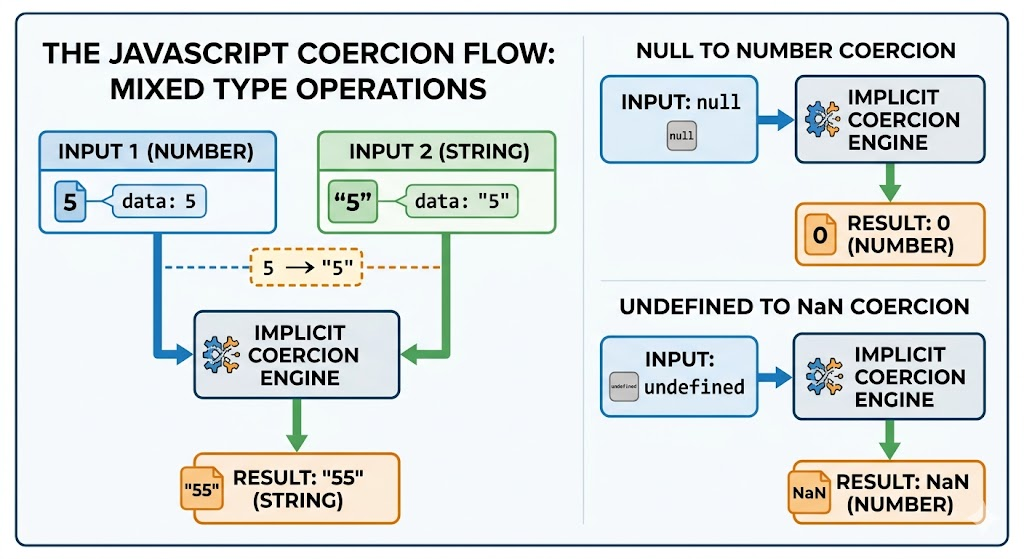
The table below breaks down how JavaScript evaluates mixed data types during common operations, highlighting where implicit coercion can quietly alter your code’s intentions.
| Initial Operation | What JavaScript Does Behind the Scenes | Final Evaluated Result | Core Data Type |
| 5 + “5” | Coerces the number 5 into a string “5” and performs concatenation. | “55” | String |
| 5 – “2” | Coerces the string “2” into a numeric 2 and performs subtraction. | 3 | Number |
| true + 1 | Coerces the boolean true into the numeric value 1. | 2 | Number |
| null + 5 | Coerces the empty reference null into the numeric value 0. | 5 | Number |
| undefined + 5 | Attempts arithmetic on an uninitialized value; cannot resolve to a number. | NaN | Number (Special value) |
3 Common Data Conversion Bottlenecks in Undergraduate Code
Most data conversion bugs in academic assignments boil down to three specific scenarios. Recognizing these patterns allows you to spot errors instantly during a code review rather than spending hours changing lines of code at random.
1. The Input Field Trap (String Dominance)
Whenever you capture user input from an HTML web form using document.getElementById(‘inputId’).value, the retrieved data is always returned as a string data type. This remains true even if the user typed a number into an <input type=”number”> field. If you immediately pass that value into an addition algorithm, JavaScript defaults to string concatenation rather than mathematical addition.
2. The Danger of Implicit Equality (== vs ===)
Using the loose equality operator (==) instructs JavaScript to perform type coercion before comparing two values. This means the engine views the statement 5 == “5” as entirely true. This loose checking can mask underlying data inconsistencies in your scripts, allowing wrong data types to slip deep into your functions before causing a visible crash.
3. The Elusive NaN (Not a Number) Cascading Failure
The value NaN is a special numeric property representing an undefined or unrepresentable mathematical result. It typically surfaces when you attempt to perform mathematical operations on non-numeric strings (e.g., trying to multiply “apple” * 10). The true danger of NaN is that it behaves like a virus: once it enters a mathematical calculation, any subsequent operations involving that variable will automatically output NaN, corrupting your entire data pipeline.
A Structured, Step-by-Step Debugging Framework
When an assignment script fails to execute correctly, jumping straight into code modifications usually leads to deeper frustration and broken logic. Instead, protect your mental focus by executing a structured triage process.
Step 1: Audit the Current Data State with typeof
Before rewriting a function, verify the exact data types running through your system. Do not rely on visual inspection alone; a variable containing 5 looks identical to a variable containing “5” in basic printouts. Inject a diagnostics check into your console:
JavaScript
console.log(“Current Value:”, criticalVariable, “| Exact Type:”, typeof criticalVariable);
This isolates whether the bug is caused by flawed operational logic or an incorrect data type arriving at your function.
Step 2: Enforce Explicit Data Upgrades
Never let the programming language guess your mathematical intentions. If you require a number for a calculation, explicitly cast the variable using built-in parsing tools. For whole numbers, utilize parseInt(value, 10), ensuring you always include the radix (base-10) parameter to prevent old browser interpretation errors. For decimal values, implement parseFloat(value).
Step 3: Shift to Strict Equality Systems
Eliminate implicit matching entirely by making the triple equals operator (===) your standard programming default. Strict equality checks both the value and the underlying data type without modifying either. Under this protocol, 5 === “5” correctly evaluates to false, forcing your code to handle structural data mismatches early.
Maintaining Debugging Focus Amid Academic Deadlines
Sustaining deep focus during complex coding sessions requires protecting your cognitive energy. Debugging is highly taxing; when you spend hours looking at broken code, cognitive tunnel vision sets in, making obvious syntax or logic mistakes nearly impossible to see.
To prevent this, adopt the Pomodoro technique: work in focused 25-minute intervals followed by a 5-minute break away from your screen. This practice resets your visual tracking and prevents development fatigue. Furthermore, write explicit pseudo-code comments describing what your variables should be doing before writing actual code. Having a clear reference map helps you spot structural logic gaps quickly when your code starts behaving unexpectedly.
Isolating subtle syntax anomalies and keeping up with advanced script design requires a steady, methodical approach. For computer science undergraduates balancing heavy academic schedules alongside practical lab work, Myassignment Services provides direct access to experienced academic experts. If you find yourself stuck on complex runtime issues right before a deadline, utilizing professional javascript assignment help can help clarify tricky concepts like execution contexts, closure scope, and asynchronous data handling. This targeted guidance ensures your practical submissions align fully with strict university evaluation criteria while preserving your study focus.
Advanced Verification: Defensive Coding Strategies
The ultimate way to avoid losing focus while debugging is to write code that prevents data conversion errors from occurring in the first place. Incorporating defensive coding habits into your programming routine saves hours of troubleshooting down the road.
Implementing Fallback Default Values
When extracting data from external sources or user elements, always plan for empty or corrupted inputs. Use logical OR (||) operators or the nullish coalescing operator (??) to assign sensible fallback values instantly:
JavaScript
// If the parsed input results in NaN, default the value to 0
let cleanUserScore = parseInt(document.getElementById(‘score’).value, 10) || 0;
Writing Micro-Validation Checks
Before passing a variable into a critical processing function, run a quick structural check. Combine the isNaN() function with type validations to build a protective barrier around your calculation algorithms:
JavaScript
function processTransaction(amount) {
if (typeof amount !== “number” || isNaN(amount)) {
console.error(“Invalid transaction format: Numeric input required.”);
return;
}
// Proceed with secure calculation logic safely
}
By taking control of your data flow and standardizing how you track variables, you can eliminate the guesswork that leads to programming burnout. This disciplined approach keeps your code stable, your workflows productive, and your focus sharp throughout your academic career.
Frequently Asked Questions
Q.1 Why does JavaScript say typeof NaN is a “number”?
Ans: This is one of the most famous quirks in programming. In the ECMAScript design standard, NaN is defined as a primitive value that represents a numeric state that cannot be calculated or expressed (such as 0 / 0). Because it still exists within the floating-point numeric spectrum, its data category is officially classified as a number.
Q.2 How can I reliably test if a variable is actually NaN?
Ans: Because NaN represents an unrepresentable value, it is unequal to everything—including itself. Therefore, running myVar === NaN will always return false. To check for it accurately, use the built-in method Number.isNaN(myVar).
Q.3 Is it better to use Number() or parseInt() for converting strings to numbers?
Ans: Number() converts the entire string directly into a number; if there are any non-numeric characters present (like “10px”), it fails completely and returns NaN. On the other hand, parseInt() scans the string from left to right and extracts any numeric characters until it hits a non-numeric character, successfully turning “10px” into the integer 10.
Q.4 What is the difference between null and undefined during mathematical data conversions?
Ans: While both represent an absence of value, JavaScript treats them quite differently during implicit coercion. The value null represents an explicit, intentional emptiness and is coerced into the number 0 during arithmetic operations. Conversely, undefined means a variable has been declared but has not yet been assigned a value; because its mathematical value is completely unknown, any arithmetic operation involving undefined will result in NaN.
Q.5 How can I prevent floating-point decimal precision errors (like 0.1 + 0.2 === 0.30000000000000004) from breaking my comparison logic?
Ans: This happens because JavaScript stores numbers using binary floating-point format (IEEE 754), which cannot perfectly represent certain decimal fractions. To prevent these minute conversion variances from breaking your logical evaluations, you should avoid comparing decimals using direct equality.
About The Author
Hi, I’m Min Seow, a senior software engineering consultant and technical writer associated with MyAssignment. With over seven years of experience in full-stack development and programming education, I specialize in breaking down complex JavaScript concepts, debugging runtime environments, and helping undergraduate STEM students build robust, clean code architectures that align with elite academic standards.














Leave a Reply